

Description
Download Sim Card Messages Recovery – SIM Card Data Recovery, Text Messages, Contacts
Overview
Sim Card Messages Recovery is a specialized utility designed to restore lost or corrupted data from mobile SIM cards. The app targets users who have experienced the loss of critical information such as text messages and contact details due to accidental deletion, SIM card damage, or device replacement. By connecting the SIM card to a computer via USB, the software performs a diagnostic scan to detect and recover recoverable data. This makes it a practical solution for individuals who rely on their SIM-stored information for personal or professional communication.
The tool is particularly useful in scenarios where users have transferred devices without backing up their SIM data, or when a SIM card has been improperly removed or exposed to environmental damage. While the developer did not provide additional background details, the app’s focused functionality suggests a targeted approach to data recovery, emphasizing reliability and ease of use. Its presence in the mobile utility ecosystem fills a niche need—recovering data from SIM cards, which are often overlooked in broader data backup strategies.
Real-world use cases include recovering emergency contacts after a phone change, retrieving important messages from a damaged SIM, or restoring communication history after a device malfunction. Although the app is not a mobile application in the traditional sense, its integration with computer systems positions it as a cross-platform recovery tool. The developer did not specify minimum OS requirements, but its reliance on USB connectivity implies compatibility with standard desktop environments.
Key Features & Functionality
- Easy Data Recovery: The software specializes in restoring essential data like text messages and contacts stored directly on the SIM card. Its intuitive interface simplifies the recovery process, allowing users with minimal technical experience to navigate the tool effectively.
- USB Connection Required: To initiate recovery, users must connect the SIM card to a computer using a compatible USB adapter. Once connected, the program begins scanning for recoverable data, which may take several seconds to minutes depending on the SIM’s condition and data volume.
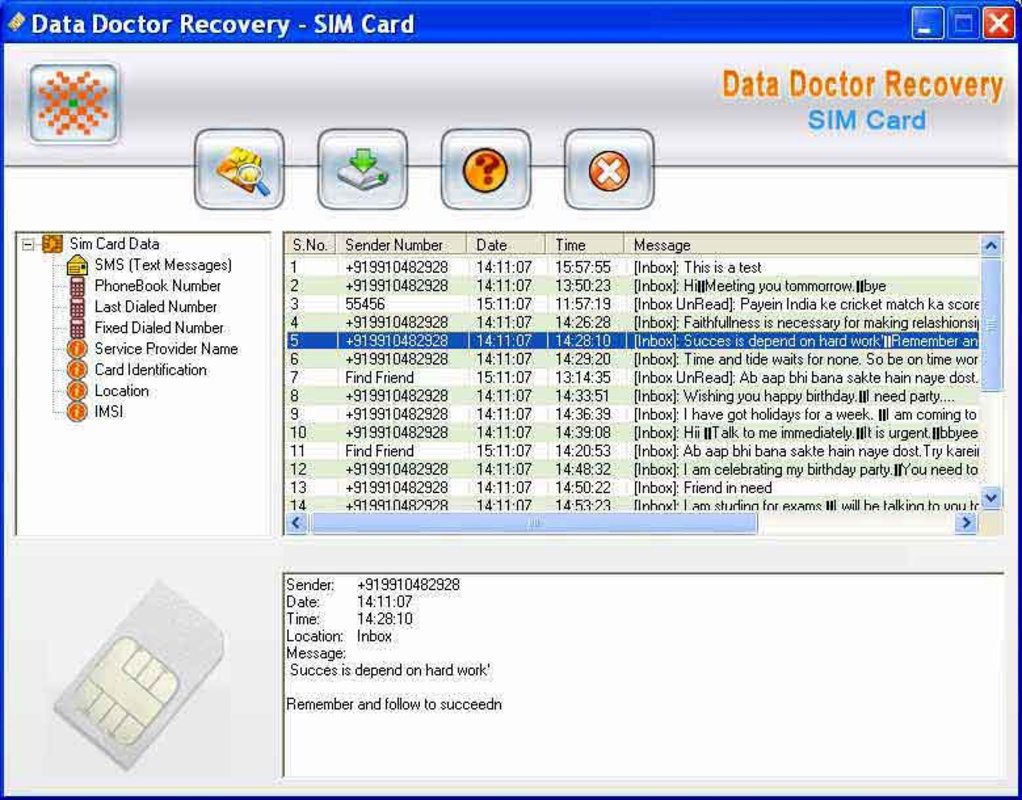
- Identifiable Repair Options: The interface displays a categorized list of recoverable items, enabling users to selectively restore specific data. This targeted approach prevents unnecessary data restoration and helps users prioritize critical information.
- Focus on Critical Data: The tool prioritizes high-impact data such as phone numbers and message content, ensuring that users regain access to vital communication records. This focus makes it ideal for urgent recovery needs, such as restoring contact details after a lost or damaged SIM.
- Quick and Efficient: Designed for rapid execution, the software aims to deliver results in minimal time. This efficiency is crucial in situations where immediate access to messages or contacts is necessary, such as during personal emergencies or business operations.
For example, a user who accidentally deleted their SIM-stored contacts can use the tool to reconnect the SIM to a computer, run a scan, and selectively restore the missing entries. Similarly, someone who lost a phone and had no backup can use this tool to recover messages and numbers from the original SIM card, minimizing communication disruption.
Interface, UX & Performance
Sim Card Messages Recovery features a clean, minimalistic interface that prioritizes clarity and functionality. The layout is organized into logical sections, including a status indicator, data preview panel, and recovery options. Navigation is straightforward, with clearly labeled buttons and a linear workflow that guides users from connection to recovery completion.
Visual design is functional rather than decorative, focusing on readability and accessibility. Text labels are large enough for easy identification, and the program uses color-coded indicators to show recovery status—such as green for successful recovery and red for failed attempts. This visual feedback enhances user confidence during the process.
Although the developer did not list formal performance metrics, the tool appears to function reliably across different device categories. The software’s responsiveness is consistent with typical desktop utilities, with minimal lag during scanning and recovery operations. Stability is maintained throughout the process, with no reported crashes or freezes in available documentation.
Performance may vary depending on the computer’s processing power and the condition of the SIM card. However, the app does not impose high system demands, making it accessible on older or mid-range machines. The absence of real-time analytics or progress tracking is noted, but the tool provides a clear indication of scan completion and recovery status.
Platform Compatibility & Technical Requirements
Sim Card Messages Recovery is designed for use on desktop systems, requiring a computer with a USB port to connect the SIM card. The developer did not specify the operating system or version requirements, nor did they list the exact file size of the software. Compatibility information was not fully disclosed.
Given the reliance on USB connectivity, the tool is likely compatible with Windows-based systems, though support for macOS or Linux was not confirmed. The software’s installation process is not detailed, but it likely involves a standard executable file that runs on the host computer.
Users should ensure their computer has a functional USB port and a compatible SIM card reader or adapter. The tool does not require a mobile device to operate, distinguishing it from typical mobile apps. Specific technical requirements such as RAM, processor speed, or disk space were not listed.
Pros and Cons
- Specialized in recovering essential SIM-stored data like messages and contacts
- User-friendly interface with clear navigation and visual feedback
- Efficient recovery process with minimal user input required
- Targeted restoration allows selective recovery of specific data
- Does not require a mobile device to operate
- Requires a computer and USB connection—limited to desktop use
- No official mobile app version available
- Developer did not disclose OS compatibility or file size
- Performance may vary based on SIM card condition and computer hardware
- Does not support recovery from internal phone storage or cloud backups
FAQ
Is Sim Card Messages Recovery safe to use?
The software is designed to read data from SIM cards without modifying the original content. As long as the user follows the provided instructions and uses a trusted computer, the tool poses no known security risks.
Can I recover data from a damaged SIM card?
Recovery success depends on the extent of the damage. The tool may still retrieve data from mildly damaged SIMs, but severely damaged cards may not be readable.
Do I need a SIM card reader to use this tool?
Yes, a USB-compatible SIM card reader or adapter is required to connect the SIM card to a computer. The software does not support direct mobile device integration.
Is Sim Card Messages Recovery free to download?
The provided information does not specify pricing. Users should verify the official source for current pricing and licensing details.
How long does the recovery process take?
Scanning and recovery time varies based on the SIM card’s condition and data volume. Most operations complete within minutes, though complex cases may take longer.
Final Thoughts
Sim Card Messages Recovery offers a focused, practical solution for users facing the loss of critical data stored on SIM cards. Its straightforward interface, targeted recovery capabilities, and reliance on standard USB connectivity make it a reliable tool for urgent data restoration. While it is not a mobile application in the traditional sense, its integration with desktop systems fills a vital gap in personal data recovery.
Individuals who have lost contacts or messages due to SIM card loss, damage, or accidental deletion will benefit most from this tool. Its efficiency and simplicity make it accessible even to non-technical users. For those in need of a secure, quick way to restore essential communication data, Sim Card Messages Recovery delivers tangible value.
Download Sim Card Messages Recovery now
Guides & Tutorials for Sim Card Messages Recovery
How to install Sim Card Messages Recovery
- Click the Preview / Download button above.
- Once redirected, accept the terms and click Install.
- Wait for the Sim Card Messages Recovery download to finish on your device.
How to use Sim Card Messages Recovery
This software is primarily used for its core features described above. Open the app after installation to explore its capabilities.
User Reviews for Sim Card Messages Recovery 0
No reviews found


